
Summary
Text is the document commonly used in any operating system. If PDF is converted to text, the file can be viewed in any device. In this essay, we will talk about how to quickly convert PDF to text. It is believed that the introduced software is a good choice for most of you.
There are 3 advantages of TXT document:
① The file size is small, easy to store.
② The format is simple, not easy to be infected by virus.
③ It is commonly used in many operating systems and mobile devices.
Generally, TXT document is used to save e-books and novels. Although PDF can display more text styles, it is easily affected by the terminal devices. For example, Kindle cannot perfectly display PDF documents.
In addition, PDF is the main format of online documentation because it can be easy to transfer and highly compatible. But it is trouble to type word by word when we want to copy some contents from the PDF. Therefore, it is necessary to convert PDF to Text. We recommend a PDF converter – Renee PDF Aide, which can quickly convert PDF to Text and edit PDF. It is the must-choice for your computer.
Renee PDF Aide is the software that supports to edit PDF and convert PDF. With utilization of the advanced OCR (Optical Character Recognition) technology, it can convert PDF to Word/Excel/PowerPoint/Image/HTML/TXT and the other common formats. You can designate the specific pages to be converted at the speed of 80 pages/min. Besides, it can repair the damaged PDF files, compress PDF files to shorten the loading time, merge several files into one and rotate the file position. En/decryption and watermark are allowed to add for PDF files, too.
What’s more, Renee PDF Aide supports English/French/German/Spanish/Portuguese/Chinese/Korean/Japanese. Under the mode of OCR, it can greatly improve the accuracy of character recognition. Even though you are a new user, you can use this software easily.
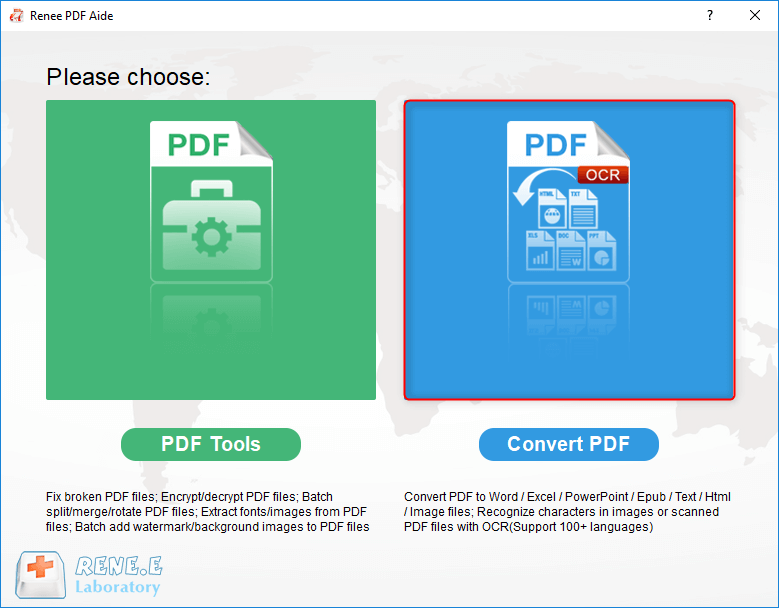
Renee PDF Aide includes two functions [ PDF Tools ] and [ Convert PDF ]. Next, we will show you how to convert PDF to text with the software.
How to convert PDF to text with Renee PDF Aide?
It is very easy to use Renee PDF Aide to convert PDF to Word/Excel/PowerPoint/Image/HTML/TXT.
Step 1: Download and install Renee PDF Aide. Select [ Convert PDF ].
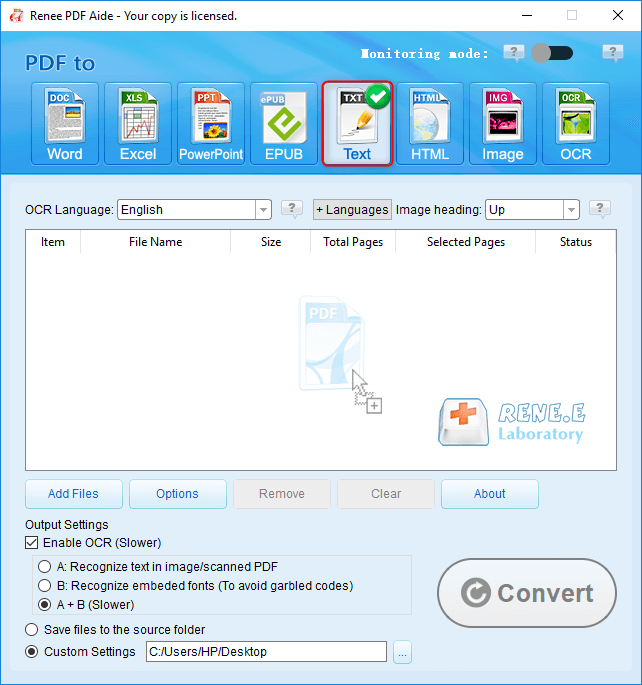
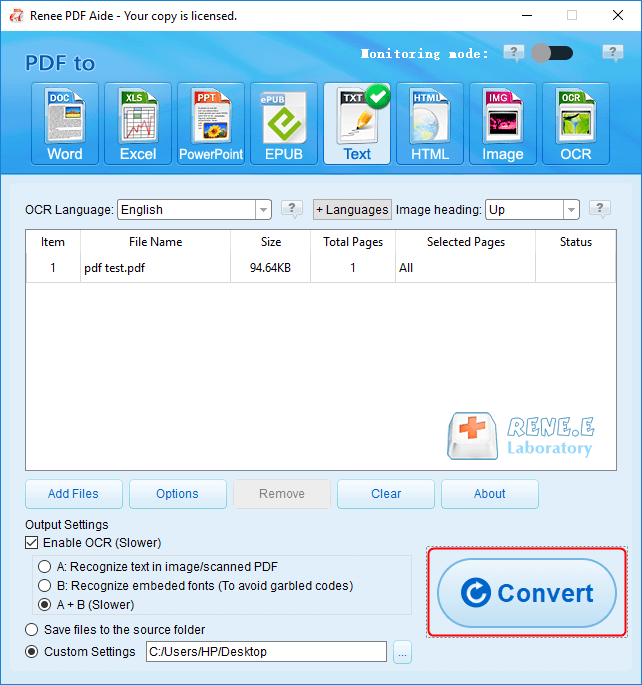
Step 2: Select one of the formats, such as [ Text ] in this case. Then, click on [ Add Files ] to select the target file. Check the option [ Enable OCR ] to improve text recognition.
Tips About the OCR function:
The OCR function can improve text recognition in two ways:
A. Recognize words on image and PDF. You can use this function to improve text recognition when you are going to convert the image-based PDF and the scanned PDF.
B. Recognize the font style to avoid garbled codes when there are different embeded font styles on the PDF file.
Step 3: Click on [ Convert ] to convert the format.

Comments
0 comments
Please sign in to leave a comment.